

20 October 2026 / 23 minutes of reading
Demystifying BitLocker
Architecture, Real-World Bypasses, and Hardening Strategies
TL;DR
Nobody is breaking AES. Attackers are sniffing the key off the motherboard, reading it out of RAM, or tricking a trusted boot or recovery component into unlocking the drive for them.
This post explains how BitLocker works, the misconceptions that leave organisations exposed, the main attack vectors and recent CVEs, and a hardening checklist. The single most effective control across nearly every attack covered here is pre-boot authentication (TPM + PIN).
Defining BitLocker’s Security Boundary
Microsoft BitLocker is a native Full Volume Encryption (FVE) feature integrated into the Windows operating system. Its primary objective is to protect Data at Rest (DaR) on physical devices, such as laptops, desktops, servers and drives, from unauthorized offline access. The FVE is basically a cornerstone of endpoint security.
Besides helping to fulfill foundational compliance requirements across regulatory frameworks (NIST, ISO 27001, HIPAA, …), it also mitigates the business impact of lost, stolen, or improperly decommissioned hardware. When functioning as intended, BitLocker encrypts the entire system volume using AES encryption, ensuring that if a storage drive is physically removed from a machine, its contents remain unreadable without the cryptographic encryption keys.

BitLocker Key Hierarchy and Trust Chains
BitLocker uses a three-tier key hierarchy so that the day-to-day encryption key never has to change when you change how the drive is unlocked.
- The Full Volume Encryption Key (FVEK) encrypts the actual data on disk. On modern Windows (10 version 1511 and later), fixed drives use XTS-AES by default, while removable drives default to AES-CBC for compatibility with older systems.
- The Volume Master Key (VMK) encrypts the FVEK. The VMK itself is encrypted by one or more key protectors. This indirection allows changing authentication methods (adding a PIN, rotating a recovery key) without re-encrypting the entire volume, only the VMK wrapping changes.
- Key protectors encrypt the VMK. These are the authentication mechanisms: TPM-only (VMK sealed to Platform Configuration Registers), TPM+PIN (adds a user-supplied PIN), startup key (a .BEK file on a USB drive, on its own or combined with the TPM), and Recovery Password (a 48-digit numerical backup code). Multiple protectors can coexist on the same volume.
So, to sum up, your actual data is encrypted with the FVEK, the FVEK is wrapped by the VMK and the VMK is wrapped by one or more key protectors. Easy!
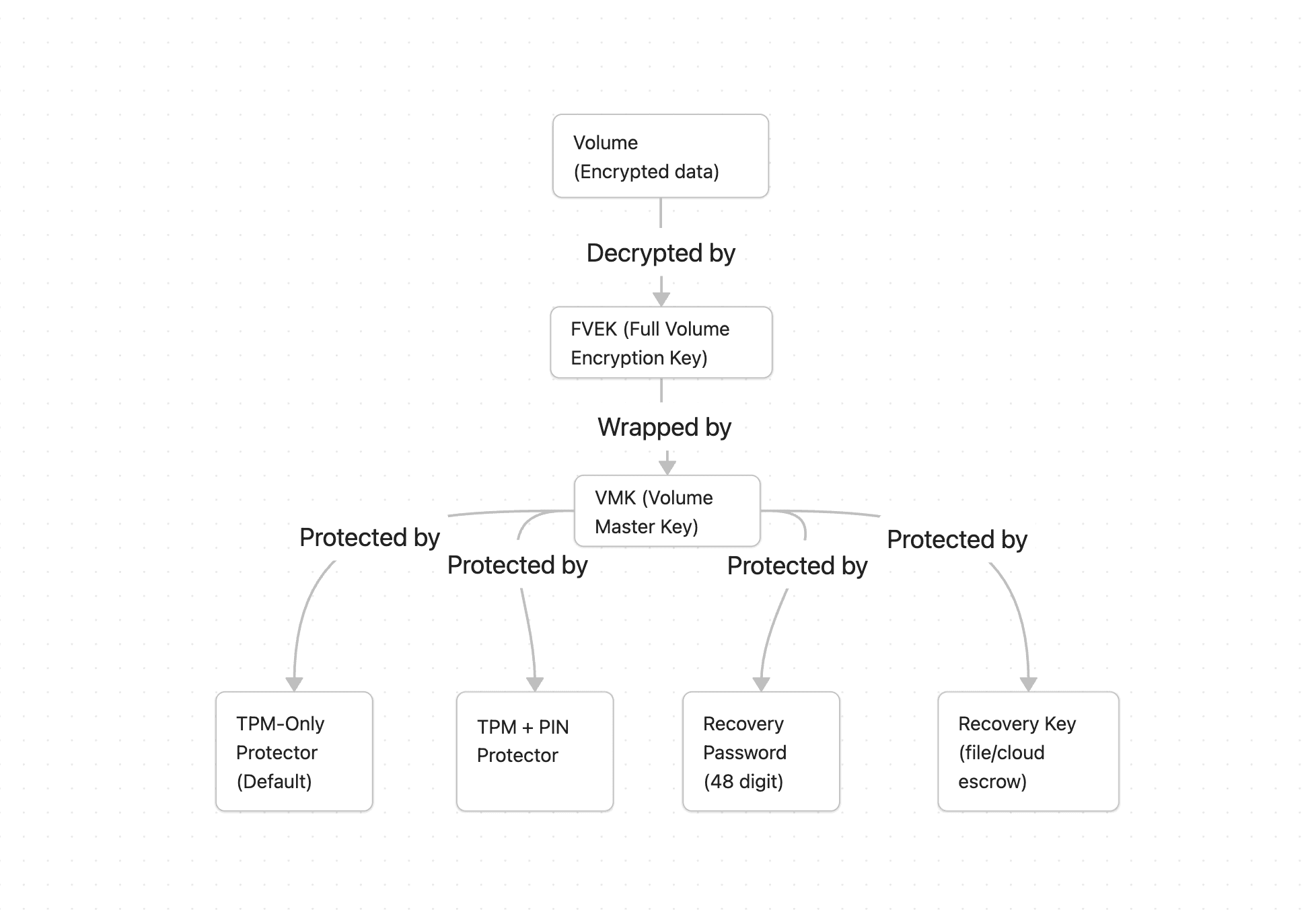
At power-on, the firmware and each subsequent boot stage measure the next component in the chain (firmware, bootloader and the boot configuration) and extend those hashes into the TPM's Platform Configuration Registers (PCRs). Where TPM (Trusted Platform Module) is a dedicated, tamper-resistant cryptographic hardware chip. In the default TPM-only setup, the VMK is sealed by the TPM against a set of PCR values, and the sealed blob itself is stored in the BitLocker metadata on disk, not inside the TPM. On every boot, the PCRs are rebuilt from scratch and the TPM only unseals the VMK if their current values match the sealing policy. If they match, the TPM releases VMK automatically, with no user interaction. The VMK decrypts the FVEK, the FVEK decrypts the volume, and Windows boots. If something does not add up, an untrusted bootloader, a changed Secure Boot configuration, different boot device, etc., the TPM, obviously, refuses to release VMK and thus, the user must provide a recovery key.
One detail matters a lot for the attacks discussed later. On modern UEFI systems with Secure Boot, BitLocker by default binds to PCR 7 (the Secure Boot policy) and PCR 11 (BitLocker access control) rather than to the hash of every individual boot file. In practice, this means the TPM trusts any boot manager signed by Microsoft, not one specific version of it. That is precisely what makes the downgrade attacks described below possible.
Uncovering Common BitLocker Assumptions
Despite its widespread adoption, significant misunderstandings remain regarding BitLocker's trust boundary and operational scope:
- Misconception 1: "TPM-only BitLocker provides complete physical security.": In default deployments, BitLocker relies on a TPM without requiring a pre-boot PIN or password. In this mode, the TPM automatically releases the encryption key once the measured boot chain (firmware, bootloader and the boot configuration) matches expected values. On systems with a discrete TPM, this exposes the key to physical bus sniffing as it travels between the TPM and the CPU. On any system, it opens doors to direct memory access (DMA) attacks and to subversion of trusted pre-boot execution paths. In our penetration testing engagements at Citadelo, this is easily the most common misconception.
- Misconception 2: "Full Disk Encryption protects data on a powered-on or sleeping device.": FVE protects data only when the encryption keys are absent from memory and cannot be released without the user. That means the device is shut down or hibernated and configured with pre-boot authentication. With TPM-only protection, powering on or resuming from hibernation unlocks the drive automatically, leaving it exposed to the attacks described above. When the system is running or in Sleep Mode, the volume is already unlocked by the operating system (data on disk stays encrypted and is decrypted on the fly) and the FVEK resides in system RAM. In these states, BitLocker is not designed to protect against local administrative abuse, OS-level vulnerabilities, or memory extraction techniques such as cold boot attacks.
- Misconception 3: "BitLocker blocks unauthorized access to the underlying drive from recovery tools.": The Windows Recovery Environment (WinRE) resides on an unencrypted partition alongside BitLocker. Because WinRE must access system files to perform repairs, it is permitted to automatically unlock the OS volume when its integrity is verified as trusted. This makes WinRE's integrity part of BitLocker's trust boundary. Repeated vulnerabilities have allowed attackers with physical access to subvert this trust and obtain a command prompt on a fully unlocked volume. These attacks target TPM-only configurations, pre-boot authentication (TPM+PIN) mitigates them.
Physical, Hardware, and Subsystem Attack Vectors
Modern BitLocker bypasses fall mainly into three “families”:
- Hardware and bus interception (TPM sniffing). With a discrete TPM (dTPM), the unsealed VMK travels in the clear over the LPC, SPI or I2C bus to the CPU. These buses are slow and their pinouts are standardised, so an attacker with brief physical access can attach a logic analyser, or a microcontroller and capture the VMK during boot and decrypt the drive offline. This type of attack was demonstrated by Pulse Security. Firmware TPMs (fTPM) and Microsoft Pluton live inside the CPU, so there is no exposed bus to tap, although fTPMs have had their own fault-injection research.
- Memory attacks (DMA and cold boot). Once the OS has unlocked the volume, the FVEK is in RAM. DMA-capable ports (Thunderbolt, some PCIe and older FireWire/ExpressCard) can be used with attack hardware to read RAM directly, bypassing the OS. Cold boot attacks on other hand, exploit the fact that DRAM retains its contents for a short time after power loss, misusing this behaviour was demonstrated by F-Secure's research. Both attacks need the key to already be in memory, meaning a running or sleeping device, or a TPM-only device that the attacker can simply power on and let unlock itself.
- Trusted-component and recovery abuse. This is where research activity from 2025 through 2026 concentrated. Because TPM-only trusts the boot manager and WinRE, attackers try to subvert those components rather than wasting time trying to crack the complex math behind encryption. They usually do this in one of two ways, boot-manager downgrade (replacing the computer’s updated startup files with older files from before a security patch was released, and because the older files are still officially approved by Microsoft, the computer accepts them) and WinRE abuse (manipulating files on the unencrypted recovery partition so a recovery flow spawns a command prompt over the auto-unlocked volume). The Nightmare-Eclipse suite and Microsoft's own BitUnlocker research, covered next, are both in this family.
Recent BitLocker Vulnerabilities Worth Mentioning
The Nightmare-Eclipse Storm
Between April and June 2026 a researcher known as Nightmare-Eclipse, also Chaotic Eclipse (who later revealed it's identity as Abdelhamid Naceri), published a number of Windows zero-days aimed at components Microsoft markets as security features, mainly BitLocker and Defender. Two of those, YellowKey and GreatXML, are BitLocker bypasses, and a third one, Bitskrieg, was built on top of YellowKey by Jonas Lykkegaard. All three are briefly described below.
YellowKey (CVE-2026-45585), disclosed publicly on 13 May 2026, targets TPM-only systems on Windows 11 24H2/25H2/26H1 and Server 2025. The attacker places crafted Transactional NTFS (TxF) files on a USB drive or the EFI partition and reboots into recovery mode. Supplied files trick that repair mode into deleting the file that would normally launch the recovery menu. With that file gone, the repair mode falls back to opening a raw command prompt instead, and because repair mode is trusted to unlock the drive so it can fix things, that command prompt is spawned on the decrypted disk. Just with access to the physical machine for a few minutes, the attacker can obtain full read/write access to everything on the drive, with no password.
Microsoft first published a mitigation script that removes the abused component (autofstx.exe) from the WinRE image, followed by a fix in the June 2026 updates. TPM+PIN blocks the published exploit, which simply stops at the PIN prompt. However, Nightmare-Eclipse claims to hold an unreleased variant that also works against TPM+PIN, so the PIN should be treated as a strong mitigation rather than a guarantee.
Bitskrieg. Just after the YellowKey was released, a well-known Windows researcher Jonas Lykkegaard, published a related attack called bitskrieg (early June 2026), which works even when Microsoft's YellowKey mitigation script is applied. The main point was that the mitigation killed one specific trigger (autofstx.exe) but not the underlying design, in which the recovery partition is unencrypted and the drive stays unlocked during boot until something triggers the TPM to lock it. Instead of Transactional NTFS, bitskrieg abuses Emergency Management Services (EMS), a legitimate Windows feature that exposes a management console over a serial port. The flow is similar, you restart into repair mode, skip past the prompt asking for a BitLocker recovery key, enable EMS on a serial port with two bcedit commands and let Windows continue booting. A second computer or external device connected over a physical or virtual communication cable (a serial port) then gets a console on the machine before the TPM is locked, with full read-write access to the unlocked drive. Microsoft fixed it in the June 2026 Patch Tuesday as CVE-2026-50507.
Because it exploits the design rather than a single bug, it applies to TPM-only systems in general. In theory this includes BitLocker-protected virtual machines, although an attacker would first need access to the VM's host or serial console and the ability to force it into recovery mode. As with the others, a startup PIN (TPM+PIN) defeats it, because then the drive never auto-unlocks in the first place.
GreatXML, released on 11 June 2026 as the latest Nightmare-Eclipse BitLocker bypass. The main idea is similar to YellowKey but a bit different. Windows has a legitimate setup file, unattend.xml, that tells the installer what to do automatically. GreatXML places a modified copy of that file (plus a small recovery folder) onto the hidden recovery partition, then restarts into repair mode. If the machine has ever run a Microsoft Defender "Offline Scan" (a malware scan that reboots into the same repair environment), repair mode reads that modified setup file and runs the attacker's instructions before any login or encryption check happens, again handing over a command prompt with full access to the encrypted drive. However, because placing the files within the recovery partition needs administrator rights, its main value is persistence and data access rather than initial entry. As of writing, GreatXML has no CVE and no official patch.
BitUnlocker (CVE-2025-48804)
In 2025, Microsoft’s own offensive research team (Alon Leviev and Netanel Ben Simon) identified four weaknesses within WinRE. The main flaw (CVE-2025-48804) involves a special file the repair mode loads at start-up (called Boot.sdi). The attacker appends a malicious recovery image to that file and changes the offset pointing at it, so the safety check validates the legitimate image while the boot actually runs the attacker's one, which quietly launches a command prompt instead of the normal repair tools. Three related flaws reached the same goal through other WinRE features: the offline scanning flow (abusing the trusted tttracer.exe tool), the ReAgent.xml configuration file and the Boot Configuration Data, which could be redirected so that the reset feature decrypted the volume. The result for each of them is the same, full access to the encrypted drive. Microsoft patched all of these in July 2025, but there's a catch. The flaws can still be reached on a fully patched machine by tricking it into loading an old version of the Windows start-up program, because that old version is still digitally signed and trusted (remember PCR 7). This is called a downgrade attack, and it is only closed once the old boot managers are revoked (see KB5025885 in the recommendations).
Bitpixie (CVE-2023-21563)
This one is older but still relevant. Normally, when Windows starts up, it briefly holds the drive’s decryption key in memory and is supposed to wipe it as soon as it's done. Bitpixie exploits a specific start-up path (a network boot feature) where Windows forgets to wipe that key. An attacker with physical access can boot the machine over the network into a small Linux system, then scan the computer's memory and simply access the key with no need to crack anything. It affects TPM-only setups. Microsoft patched the boot manager in January 2023, but there is the same catch as with BitUnlocker, the old, vulnerable start-up programs are still validly signed, so an attacker can simply boot one of them. Blocking that downgrade requires the Secure Boot certificate rotation and revocation (KB5025885). The attack also relies on booting a Linux loader signed under Microsoft's third-party UEFI certificate, so disabling network (PXE) boot, and that certificate where it is not needed, removes a key ingredient.
Actionable Security Recommendations
As we frequently demonstrate at Citadelo, default BitLocker is simply not enough against a motivated attacker with physical access. Organizations must build true defense-in-depth across pre-boot authentication, firmware and hardware security, recovery hygiene, and continuous detection
Move from TPM-only to pre-boot authentication (TPM + PIN)
This is the single highest-impact control. Requiring a PIN (or USB startup key) means the TPM will not release the VMK until the user authenticates, which defeats one-time bus sniffing, the WinRE bypasses, bitpixie's default path, and cold boot/DMA on a powered-off device.
- Group Policy: Computer Configuration > Administrative Templates > Windows Components > BitLocker Drive Encryption > Operating System Drives > Require additional authentication at startup = Enabled, then Require startup PIN with TPM.
- Enable enhanced PINs and set a sensible minimum length (commonly 6-8+). TPM 2.0 anti-hammering lockout is on by default and managed by Windows, so it limits PIN guessing without extra configuration.
- For fixed desktops where a PIN is impractical, consider BitLocker Network Unlock so the PIN is only required off the corporate network.
As mentioned, enabling pre-boot authentication represents the most impactful defense against physical and recovery-based exploitation. Far from being a measure reserved solely for corporate environments, it is an essential baseline for any user concerned with data privacy. Best of all, it costs nothing to implement while dramatically raising the bar against exploitation.
Harden firmware and the boot environment
- Enforce Secure Boot and set a UEFI/BIOS admin password to block boot-order changes and external boot media. Disable network (PXE) boot where it is not needed.
- Apply the Secure Boot revocations described in KB5025885 (not a single patch, but a staged process applied on top of the monthly updates), including the Windows UEFI CA 2023 rollout and revocation of the Windows Production PCA 2011 certificate. Note that the 2011 certificates expiring in 2026 does not block them, as firmware ignores expiry, only the revocation does.
- Verify that Kernel DMA Protection is active. It depends on IOMMU support in hardware and firmware rather than a policy switch. On older devices without it, enable the "Disable new DMA devices when this computer is locked" policy, and prefer Hibernate over Sleep.
Recovery-environment and image hygiene
- Apply Patch Tuesday updates that service WinRE promptly
- For YellowKey and Bitskrieg specifically, apply the June 2026 updates, including the WinRE updates
- Restrict who can write to and mount the recovery partition, standard admins should not be able to stage unattend.xml or ReAgent.xml there unsupervised.
Detection and SOC alignment
- Alert on unattend.xml or new Recovery/WindowsRE directories written to the recovery-partition root by anything other than Windows Update or WinRE setup.
- Monitor Defender Offline Scan being scheduled or triggered by user-context processes, and WinRE boots that follow shortly after a recovery-partition write.
- Watch for diskpart, Mount-DiskImage or manage-bde activity targeting recovery volumes, and for repeated unexpected recovery-key prompts.
Final Takeaways
BitLocker's core cryptography is sound. What the disclosures from 2025 through 2026 demonstrated, and what our team at Citadelo routinely validates during penetration tests, is that full disk encryption is an entire ecosystem, not a compliance checkbox. The cipher itself may be unbreakable, but the trust architecture surrounding it (firmware, boot manager, recovery environment, and system memory) can still be subverted. While default TPM-only mode simplifies help-desk workflows and user adoption, it provides inadequate protection against physical compromise. Our experience at Citadelo shows that pre-boot authentication is the single control capable of shrinking this attack surface to a minimum. For any endpoint that could fall into the wrong hands, TPM+PIN must be the standard baseline, not the exception.
Is Your Full Disk Encryption Really Secure?
BitLocker protects your data, but default configurations can leave devices vulnerable to physical attacks. Our penetration testing experts help identify security weaknesses before attackers can exploit them.
Other interesting articles
All news




Sign up for our newsletter for all the important cybersecurity and ethical hacking news.
© 2024 citadelo AG. All rights reserved.


